

Law firms manage an ever-growing volume of judgments, contracts, pleadings, affidavits, emails and supporting evidence. Finding the right document is important, but understanding how information connects across multiple documents is often the greater challenge.
This is where the LiquidText Enterprise and iManage integration can add value to a law firm’s existing legal technology ecosystem.
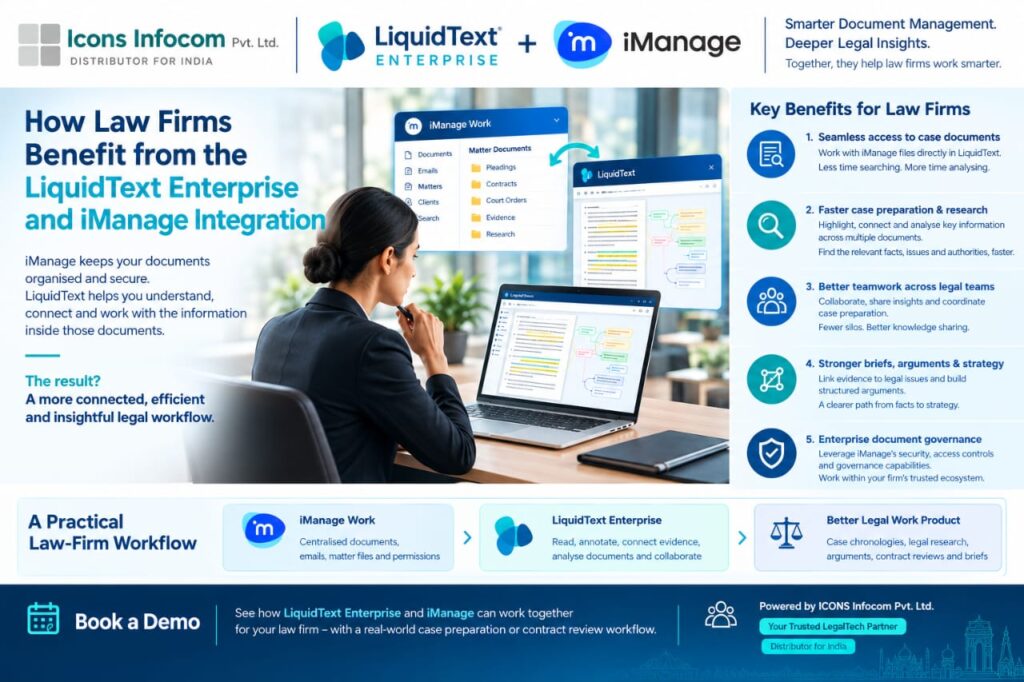
iManage provides a document and email management environment for organising, accessing and governing legal information. LiquidText complements this by providing an interactive workspace where lawyers can read, annotate, extract, connect and analyse information across documents.
Together, these platforms can help legal teams move from simply managing documents to developing more structured, connected and traceable legal analysis.
iManage helps law firms manage matter-related documents, emails, permissions and established document workflows. LiquidText Enterprise supports in-depth document analysis, evidence organisation and collaborative legal research.
The integration connects these complementary capabilities, allowing lawyers to work with documents from their iManage environment within LiquidText, subject to the deployed integration, configuration and access permissions.
The goal is straightforward: help lawyers spend less time navigating information and more time understanding it.
Legal professionals frequently move between matter folders, lengthy PDFs, research materials and supporting evidence. Switching between applications and manually locating relevant passages can interrupt the research process.
With the supported iManage and LiquidText workflow, lawyers can access relevant documents in their established document management environment and use LiquidText’s workspace for closer examination.
Key benefits:
A more connected document access and analysis workflow.
Less manual effort when navigating large document collections.
A dedicated workspace for reviewing and organising relevant information.
Legal research often involves reviewing lengthy judgments, comparing precedents and identifying facts spread across multiple documents.
LiquidText enables lawyers to highlight important passages, extract relevant content, connect related information and create a visual overview of complex material.
When used alongside iManage, this approach can help legal teams organise their research while maintaining a connection to the underlying source documents.
Key benefits:
Identify relevant facts, legal issues and supporting authorities more efficiently.
Compare information across multiple documents.
Organise research findings before drafting submissions or case notes.
Complex legal matters often involve partners, associates, researchers and other professionals working on related documents.
LiquidText Enterprise offers collaboration capabilities that can help teams share analytical insights, discuss source material and coordinate their work, depending on the available features and deployment configuration.
Combined with iManage’s document management environment, this can support a more organised approach to collaborative legal work.
Key benefits:
Share relevant extracts and analytical insights.
Improve coordination between team members.
Reduce fragmented research notes and disconnected workflows.
Building a persuasive legal argument requires more than collecting documents. Lawyers must establish connections between facts, evidence, legal provisions and relevant authorities.
LiquidText allows users to bring important extracts together, connect related passages and organise their reasoning within a dedicated workspace.
For litigation teams, this can support the preparation of case chronologies, arguments, internal briefs and submissions. For transactional teams, it can help organise findings from contracts and due diligence documents.
Key benefits:
Connect evidence with relevant legal issues.
Identify relationships and inconsistencies across documents.
Develop a clearer structure for case analysis and legal drafting.
Law firms need to maintain established policies for document access, confidentiality and information management.
iManage provides document management and governance capabilities, while LiquidText Enterprise offers enterprise-oriented deployment and integration options.
A well-configured workflow can help firms incorporate document analysis into their existing technology environment without treating individual LiquidText workspaces as substitutes for the official document repository.
The precise handling of annotations, saving changes, permissions, identity management and data storage depends on the integration and the firm’s configuration. These details should be verified before deployment.
Key benefits:
Align document analysis with established firm workflows.
Maintain clarity about the official document repository.
Evaluate enterprise access, identity and deployment requirements.
The combined workflow can be understood in four stages.
Step 1: Manage documents in iManage
Store and organise matter-related documents, emails and other legal information within the firm’s established document management environment.
Step 2: Analyse documents in LiquidText Enterprise
Review source material, highlight relevant passages, extract information and connect related findings within a dedicated workspace.
Step 3: Develop legal insights collaboratively
Organise evidence, compare documents, discuss findings and develop a structured understanding of the matter.
Step 4: Prepare legal work products
Use the resulting analysis to support case chronologies, research notes, arguments, contract reviews and briefs. Where supported by the deployed integration, annotations can be saved back to iManage.
The exact workflow and available capabilities should be confirmed for the firm’s specific deployment.
Connect witness statements, exhibits, pleadings and judgments to organise evidence and develop a clearer case theory.
Review contracts, compare clauses and organise findings from due diligence and related transaction documents.
Connect judgments, statutes and precedents while keeping analytical notes linked to relevant source passages.
Help legal professionals organise research findings and develop reusable insights within the firm’s established information governance framework.
For Indian law firms already using iManage, LiquidText Enterprise offers an opportunity to add a dedicated legal document analysis workspace to their existing technology environment.
Rather than focusing only on document storage and retrieval, firms can explore ways to improve how lawyers interpret information, connect evidence and prepare complex matters.
Potential advantages include:
More organised legal research across large document collections.
Improved visibility into relationships between facts and evidence.
A more structured approach to collaborative case preparation.
Greater continuity between document management and legal analysis.
An enterprise-focused workflow that can be evaluated against the firm’s security and deployment requirements.
The value will depend on the firm’s existing processes, user requirements and the specific integration capabilities available.
Modern legal work requires both effective document management and deeper document analysis.
iManage helps law firms manage their legal information, while LiquidText enables lawyers to explore, connect and organise the information within their documents.
Together, they offer a complementary approach to legal research, evidence analysis and case preparation.
For firms looking to improve their legal workflows, evaluating the integration against a real-world matter can help demonstrate where it fits into existing processes.
ICONS Infocom helps legal professionals explore LegalTech solutions designed to support document-intensive work.
If your law firm uses iManage and wants to explore how LiquidText Enterprise can complement its document management workflow, a personalised demonstration is a practical place to start.
See how your legal team can connect document management with deeper legal analysis.
Contact ICONS Infocom to discuss your requirements and arrange a demonstration.
Website: https://www.liquidtext.in/
It connects iManage’s document management environment with LiquidText’s document analysis workspace, enabling supported workflows for accessing and analysing legal documents. Exact capabilities depend on the deployed integration and configuration.
LiquidText helps lawyers review lengthy documents, highlight important passages, extract information, connect related evidence and organise legal research within an interactive workspace.
Yes. Its document analysis and annotation capabilities can support case preparation, legal research, evidence organisation, contract review and the development of structured arguments.
The announced workflow includes saving annotations back to iManage. However, availability and behaviour should be confirmed against the specific integration version and deployment.
No. The platforms serve complementary purposes. iManage provides document management capabilities, while LiquidText focuses on document analysis and information organisation.
A firm can arrange a demonstration using a representative legal workflow and assess document access, annotation handling, collaboration, permissions, data storage and deployment requirements before implementation.